EXPLORE BEYOND THE MAP
Let the world unfold.
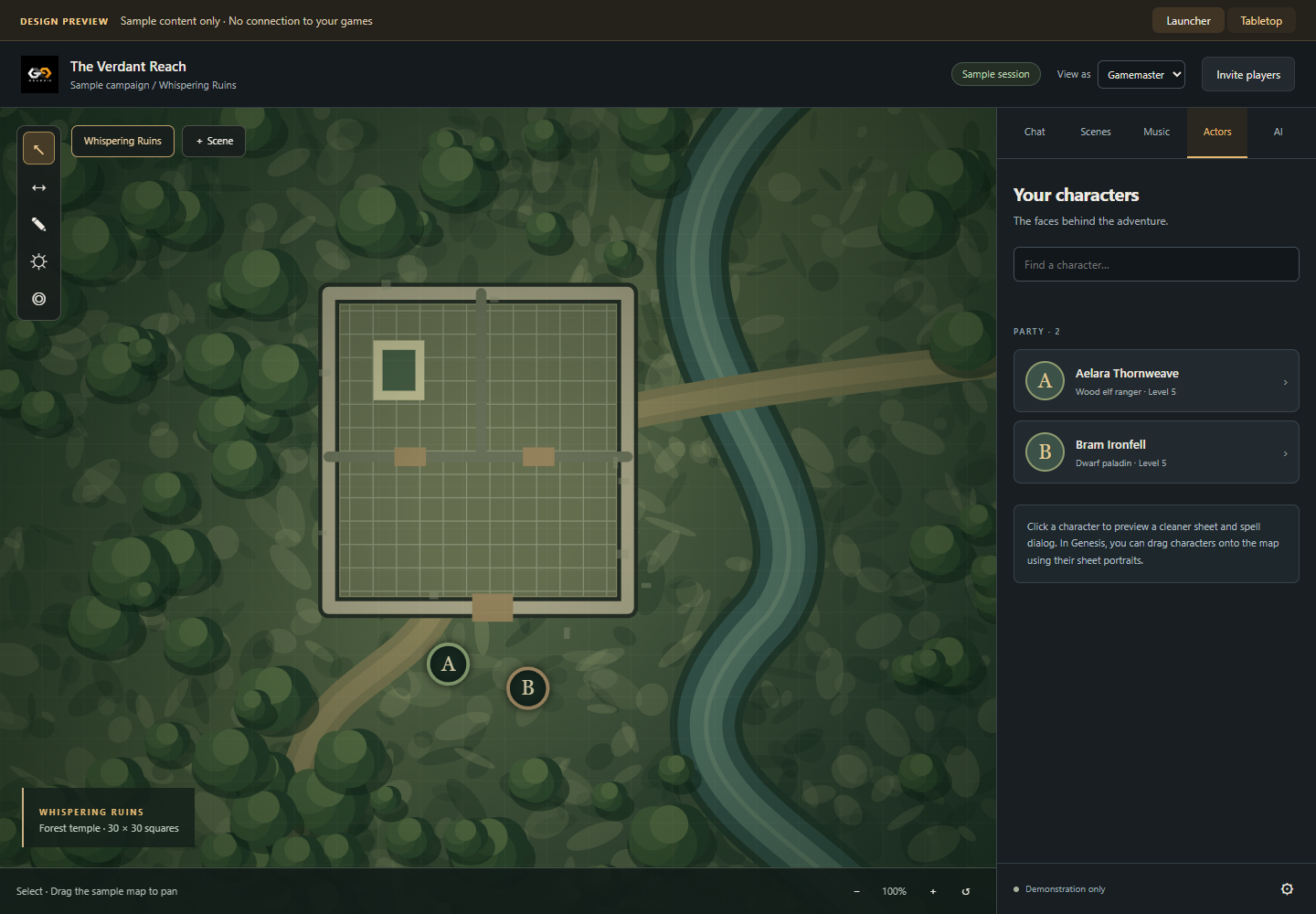
Generate connected natural terrain from a seed, with forests, structures and fauna. Explore an endless scene and keep the party moving.
 GENESIS VTT
A VIRTUAL TABLETOP FOR YOUR NEXT CHAPTER
Bring your adventures together. Build a world, gather your players, and make room for the unexpected.
Windows 10 & 11 · 64-bit · Windows ZIP
A PLACE FOR THE WHOLE ADVENTURE
Maps, characters and shared dice in one tabletop. A separate library keeps your campaigns organized.
MAKE IT YOUR OWN
EXPLORE BEYOND THE MAP
Generate connected natural terrain from a seed, with forests, structures and fauna. Explore an endless scene and keep the party moving.
BEND THE SPACE
Mobius corridors connect their ends to create looping spaces. Build an impossible hallway into your next encounter.
SET THE SCENE
Use walls, doors, lighting, fog and map backgrounds. Share music while each player controls their own listening volume.
BUILD ON YOUR IDEAS
Import and export Genesis mod ZIPs, install from links, and choose which mods each world uses. Search community projects from the library.
BRING YOUR OWN AI
Use the GM assistant workflow to create map backgrounds with a supported AI connection. Review the result before adding it to a scene.
Requires a compatible AI tool and its own account or setup.
Run Genesis on your computer and invite players using its browser link. Keep the app running while you play. Internet access requires a reachable connection; see hosting help.
ONE LIBRARY. DIFFERENT ADVENTURES.
Every world has its own game system, characters and settings. Five systems are included, with different levels of rules and content support.
Character and NPC sheets, shared rolls, spells, equipment and character import tools.
SRD 5.1 + 5.2.1 contentRemaster PC/NPC sheets, proficiency, degrees of success, attack penalties and spell resources.
97 Player Core referencesOriginal investigator and NPC sheets with percentile checks, bonus and penalty dice, and resource trackers.
No published compendium contentOriginal character sheets with dice pools, Hunger dice, Rouse checks and trackers.
No published compendium contentCustom attributes, inventory, notes and dice formulas. Bring the rules your group wants to play.
Your own game contentThese are sheet and dice integrations, not complete character builders or fully automated rules engines. Effects and advancement may need manual input. Pathfinder's references are a starter selection, not a complete SRD. The two story systems ship empty published-content libraries. Game names identify compatibility; Genesis is not endorsed by their publishers.
YOUR NEXT SESSION STARTS HERE
Save the Windows ZIP and extract the entire folder. Run Genesis-VTT-Setup.exe from the extracted files to install and create a shortcut. Windows 10 or 11, 64-bit, is required.
Set up your GM profile, create a game and choose its system. Fresh installations start with no worlds. Passwords are optional; use at least six characters if you set one.
Launch your world, then use Invite players. Players open the host's address in a browser and sign in to their game accounts.
The host needs a reachable address and port. Depending on the network, configure router port forwarding or supported UPnP and allow Genesis through the host's firewall. A private home-network address only works from that network.
Direct HTTP is unencrypted. Trusted HTTPS requires a valid certificate and reachable HTTPS configuration; Genesis does not automatically guarantee it. Ask the host for the exact invitation address.
Close Genesis before updating. Keep your saved-data folder, and export important worlds from the library as a backup. A world export contains game data; keep copies of your uploaded assets too.
Existing worlds, settings and account data are kept separately from the desktop app. Change your GM profile and optional password in Settings. More questions? Read the FAQ.
A FEW GOOD QUESTIONS
Download once. Build your library.
Bring your group together.
No. This is the Genesis product and download website. The downloaded app hosts the tabletop on your computer. Players use the invitation link from your host, not this website.
No. Players join the running game in a browser. The host needs to keep Genesis and their computer running, with the game reachable over the chosen network.
You can run local games and use installed content without internet access. Players on the same local network can connect to the host's local address. Downloads, online AI connections and community searches need internet access.
The Windows app, its bundled server runtime, five game system packages and built-in tabletop tools. You create your own worlds and GM profile. See system coverage for the included content and manual rules limitations.
Yes. Import map images as scene backgrounds and use Genesis-compatible systems and mods. Foundry modules are not interchangeable with Genesis modules. Only install code from authors you trust.
The GM profile covers your library, rather than a single world. A password is optional and can be changed in Settings. When set, it must contain at least six characters. Use a password when making your game publicly reachable.
Check that the world is launched, the app is open and the player has the right invitation address. Internet connections may need router forwarding and a firewall allowance. Some providers use shared addressing that blocks incoming connections. See connection help.
THE NEXT CHAPTER IS YOURS
One Windows ZIP. Your browser verifies the download before saving it.
Windows 10 22H2 or Windows 11 · x64 · .NET Framework 4.8 and WebView2